Vimpo Blog · October 16, 2026
How we cut long subtitles down to size
Subtitles from speech recognition often come as three lines of the original plus three lines of translation, covering a good part of the picture and staying there for over ten seconds. While you watch the picture, the subtitle has already run ahead; while you read the subtitle, you lose track of which sentence is being spoken.
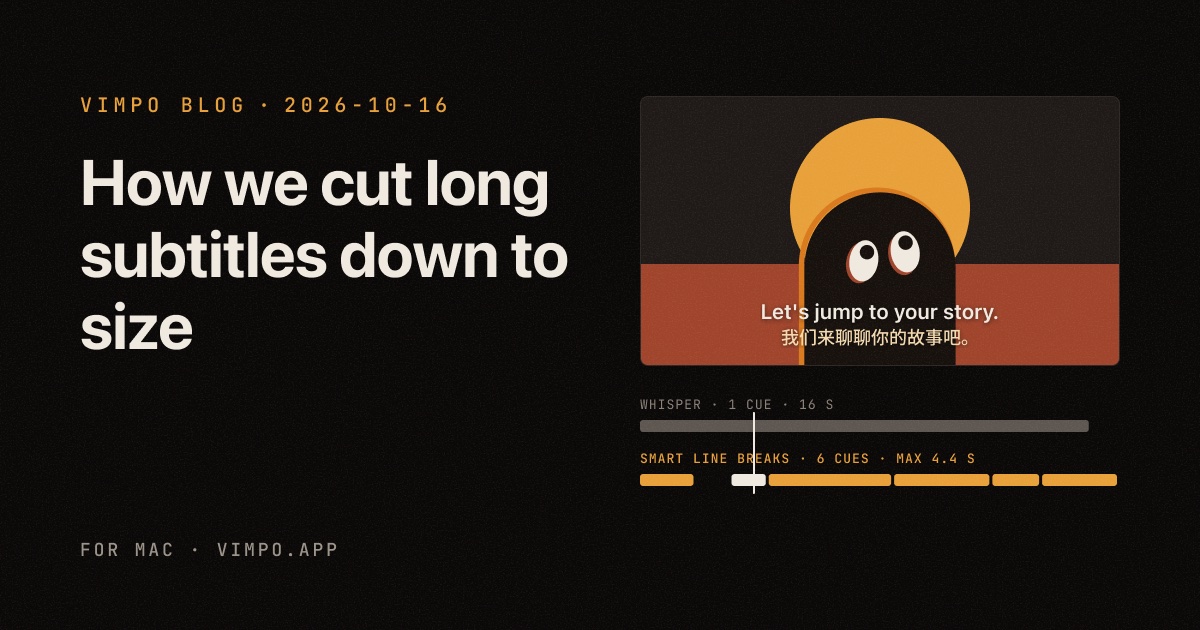
Here are 17 seconds of an interview, before on the left and now on the right:
16 岁的年轻人。我们来聊聊你的故事吧。你从小就非常聪明,比如参加数学奥林匹克。带我们回到那个时期的 Alex 吧,你当时是什么感觉?在想什么?是什么驱使你走上这条路?
16 year olds in this audience, you know. Let's jump to your story. I mean, you came up always really smart, like Math Olympiad. Like, jump us to, you know, the Alex of that time. Like, what were you feeling? What were you thinking? And what drove you down this road?
1 subtitle, on screen for 16 seconds
在场的观众里还有 16 岁的年轻人。
there's some 16 year olds in this audience, you know.
6 subtitles, 1–4 seconds each, following the speech
Where long subtitles come from
Vimpo uses Whisper to turn speech into subtitles on your Mac. Whisper splits what it hears into segments, each with a start and end time, and we used to show each segment as one subtitle.
The trouble is that those segments follow how Whisper processes audio, not how people talk. With someone who speaks fast and rarely pauses, a segment can run for over ten seconds and hundreds of characters. In the first six minutes of the interview above, Whisper gave us 27 segments: 13 seconds and 213 characters on average, and the longest was 28 seconds and 453 characters. Translation goes line by line, so the Chinese was just as long as the English.
Why the obvious fixes don't work
The first two ideas were the obvious ones.
- Cut at a character limit. whisper.cpp has a
max_lenoption that splits once a segment passes so many characters. But it only looks at length, so it happily cuts at "the | Alex". - Hand it to an LLM. A language model understands meaning best and breaks lines most naturally. But it doesn't know when each word was spoken, and even when told "only add line breaks, don't change the words", it tidies words and drops filler, and then the text no longer matches the timing. It also needs the internet and an API key.
Then it clicked: breaking lines means answering two questions. Where is the most natural place to break? And when does each half start? Those map neatly onto Apple's NaturalLanguage and Whisper.
Step one: have Whisper time every word
whisper.cpp supports word-level timestamps through DTW. It reads the weights of a few specific attention heads in the model, sees which part of the audio each token was attending to when it was produced, and aligns the text with the audio along one timeline. Every word gets its own time: "So" at 16.30 s, "why" at 16.60 s.
There was a catch. On the first run, every word's time came back as -1. whisper.cpp turns on Flash Attention by default, and to be fast it never keeps the full attention matrix around, so DTW has nothing to read. So when Smart Line Breaks is on, Vimpo turns Flash Attention off. The cost is a slightly slower transcription: in our tests, six minutes of audio went from about 12 seconds to 14.
Step two: read the sentence with NaturalLanguage
With the timing in hand, the next thing to know is the shape of the sentence. The NaturalLanguage framework built into macOS splits text into sentences and words and tags each word's part of speech: noun, preposition, conjunction, determiner. It handles Chinese word segmentation too, with no extra model to download.
First, cut at sentence ends and clear pauses. For any sentence that's still too long, score every gap between two words, break at the best one, and keep going on each half until every subtitle fits in a line or two. The scoring goes roughly like this:
- A comma or semicolon right before the gap: points up.
- A pause between the two words: points up, more for a longer pause. Where the speaker takes a breath is usually the most natural break.
- The next word is a conjunction like and, but or because: points up, since a new clause starts there.
- The word before the gap is "the", "of", "to" or similar: points down. They can't be left dangling at the end of a line.
- Between an adjective and its noun: points down, so a phrase isn't split across two lines.
- Two halves of similar length: points up. Either half too short: points down.
Then some finishing: scraps that are too short get glued to a neighbour, and every subtitle appears 0.2 seconds early and stays 0.3 seconds longer, so your eyes have time to read it.
Chinese is a little different
Chinese videos bring a different problem: Whisper's Chinese output has almost no punctuation. A six-minute Chinese podcast we tested came back without a single punctuation mark, so there are no sentences to split on.
The pauses are still there, though, and NaturalLanguage segments and tags Chinese well. So for Chinese, pauses do most of the work, along with the words that often open a new clause in spoken Chinese, like 但是 (but), 所以 (so), 其实 (actually) and 比如说 (for example). A few rules are just for Chinese: never break right after 的, never split 一 from 个 (a number from its measure word), and never leave 这个 or 那个 (this, that) at the end of a line.
Whisper on its own8.5 s · 49 characters
就是没想到说原来在中国市场上其实最早在播客里能跑出来的商业模式居然是直接给品牌做他们的内容的服务商
Smart Line Breaks3 subtitles
1:10.2就是没想到说原来在中国市场上
1:12.6其实最早在播客里能跑出来的商业模式
1:14.9居然是直接给品牌做他们的内容的服务商
The result
For the first six minutes of the interview, the subtitles went from 27 to 127: 2.7 seconds and 44 characters on average, and even the longest is only 5 seconds. The six minutes of Chinese podcast became 141 subtitles, none longer than 22 characters.
To check the timing, we picked some subtitles at random, cut the audio at their start and end times, and ran Whisper on each clip again. What it heard matched the subtitle, with no subtitle early, late or missing half a sentence.
What isn't perfect yet
- In Chinese, about 5% of the breaks are a bit off, usually where the speaker paused or restarted mid-thought. Rules alone can't read meaning.
- It only applies to subtitles transcribed from now on. Existing subtitles need to be transcribed again to get shorter, and a video's own subtitles stay as they are.
- Transcription is a little slower with it on.
That 5% is exactly what language models are good at. We're considering one more layer later: if you use AI translation, the model could fine-tune the breaks while Whisper still provides the timing.
How to turn it on
Smart Line Breaks is off by default. Under "After download" when you download a video, or "After import" when you import one, there's a Smart Line Breaks checkbox below Transcribe. Click "See the difference" next to it to see the comparison from the top of this post.
It all happens on your Mac, with no internet needed.