Vimpo vs Language Reactor: learning the language, or making something from the video
Both put two languages on screen at once, so Vimpo and Language Reactor get mentioned together. They're built for different people, though. Language Reactor is for studying a language. Vimpo is for understanding a video, then making something from it.
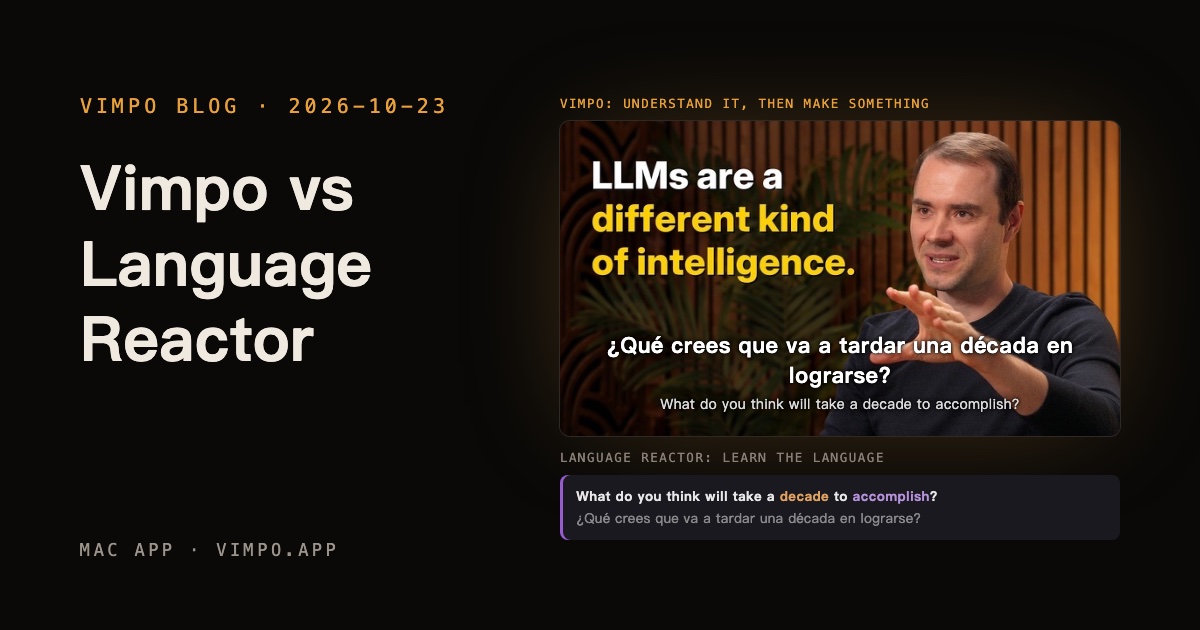
Same video, same minute:
Same video, same minute
Andrej Karpathy — We’re summoning ghosts, not building animals
¿Qué crees que va a tardar una década en lograrse?
What do you think will take a decade to accomplish?
1:46 / 2:26:08Both
Built for understanding, then making: translated by your own model, a few lines away from a clip.
youtube.com/watch?v=lXUZvyajciYLR
lograrconseguir, cumplirWhat do you think will take a decade to accomplish?
¿Qué crees que va a tardar una década en lograrse?
LRAuto-pause
Built for learning: click a word for the dictionary, mark words, pause after every line.
Your own model, bought once
Vimpo translates with your own API key, from DeepSeek, OpenAI, Claude, Gemini and others, or with a local model through Ollama or LM Studio. You pay the provider directly for what you use, or nothing at all. Vimpo itself is a one-time purchase. Speech recognition runs on your Mac with Whisper, so videos without subtitles work too, on YouTube, Bilibili or any of a thousand other sites.
Make something from it
Found a moment worth sharing? Pick the lines in Studio (⌘2), press ⌘B, and that's a clip. AI can suggest the parts that stand on their own, and every clip exports with its subtitles burned in:
Click a line, then Shift-click another.
Trim it on the timeline; its edges snap to the lines.
Your own model reads the subtitles and picks moments that stand on their own.
Outline, box or large type, in one language or two.
Subtitles burned in, or FCPXML to keep editing in Final Cut or Premiere.
Andrej Karpathy — We’re summoning ghosts, not building animals
CinemaStudio
Export
Transcript
1:21En realidad, es mucho más exacto llamarla la década de los agentes.This is really a lot more accurately described as the decade of agents.
1:46¿Qué crees que va a tardar una década en lograrse?What do you think will take a decade to accomplish?
1:56Piénsalo casi como un empleado o un becario que contratas para trabajar contigo.You should think of it almost like an employee or an intern that you would hire to work with you.
2:13Si hoy no lo haces, es porque todavía no funcionan.The reason you don't do it today is because they just don't work.
2:23No tienen aprendizaje continuo. Les cuentas algo y no lo recuerdan.They don't have continual learning. You can't just tell them something and they'll remember it.
2:28Resolver todos esos problemas llevará más o menos una década.It will take about a decade to work through all of those issues.
2 lines selected
1:46 – 2:13 · 0:27
Make Clip
En realidad, es mucho más exacto llamarla la década de los agentes.
This is really a lot more accurately described as the decade of agents.
¿Qué crees que va a tardar una década en lograrse?
What do you think will take a decade to accomplish?
Si hoy no lo haces, es porque todavía no funcionan.
The reason you don't do it today is because they just don't work.
Si hoy no lo haces, es porque todavía no funcionan.
The reason you don't do it today is because they just don't work.
00:01:46:12
IO
ClipsSubtitle Style
No clips yet
Clips1 · 0:27 total2 · 0:52 total3 · 1:15 total
The decade of agents1:21 – 1:46 · 0:25
What will take a decade?1:46 – 2:13 · 0:27
Why agents don't work yet2:13 – 2:36 · 0:23
AI Highlights
Moments from the subtitles that stand on their own
Find Highlights
AI Picks2 · 0:48 totalAdd All
1The decade of agents1:21 – 1:46 · 0:25
Add to Clips
2Why agents don't work yet2:13 – 2:36 · 0:23
Presets
SubtitlesOutlineSubtitlesBoxSubtitlesLarge
Two Languages
Translation on TopOriginal on Top
TimelineAI Picks 2
PictureSpanishSound
1:301:452:002:152:30En realidad, es mucho más exacto llamarla la década de los agentes.¿Qué crees que va a tardar una década en lograrse?Piénsalo casi como un empleado o un becario que contratas para trabajar contigo.Si hoy no lo haces, es porque todavía no funcionan.No tienen aprendizaje continuo. Les cuentas algo y no lo recuerdan.Resolver todos esos problemas llevará más o menos una década.
1
2
The decade of agents
What will take a decade?
Why agents don't work yet
Export
The decade of agents0:25
What will take a decade?0:27
Why agents don't work yet0:23
Subtitles
Burn InSRT File
Quality
720p1080p
FCPXML, to keep editing in Final Cut / Premiere
CancelExport 3 Clips…
For learning a language, use Language Reactor
Click a word and its dictionary opens, with examples. Less common words are coloured, you can mark the ones you know, and it pauses after every line so you can repeat it. It works on Netflix, and saved words go to Anki. Vimpo has none of this, and doesn't try to.
Side by side
Vimpo
Language Reactor
Price
Free during the beta, a one-time purchase at release
Free, with a paid Pro
Translation model
Your API key, or a local model
Built in
Two languages on screen
✓
✓
Speech transcribed on your Mac
✓
—
Clips picked from the transcript
✓
—
Video export with subtitles burned in
✓
—
Sites
1,000+, plus your own files
Netflix and YouTube
Click a word for the dictionary
—
✓
Auto-pause and repeat a line
—
✓
Save words, export to Anki
—
✓
Netflix
—
✓
The Language Reactor column is based on languagereactor.com and its Chrome Web Store listing (version 6.0.1, October 2026). In that column, a dash means neither mentions the feature.
Which one to use
You want to understand the video with your own model, and no subscription: Vimpo.
You make clips with subtitles from long videos: Vimpo.
You're studying the language and want a dictionary, word lists and Anki: Language Reactor.